Omnichannel is more than just “online + offline”
Modern customers expect maximum flexibility when shopping. They want to decide for themselves whether they have a product delivered to their home or pick it up at the store the same day. Right here is Click-and-collect with Shopify as a central part of a functioning omnichannel strategy.
What used to be an additional option is now standard: Online ordering with collection in the shop must work quickly, transparently and reliably. Shopify combines the online shop and Shopify POS in a uniform system. The focus is clearly on Unified commerce: one system, one database, one consistent workflow.
Learn more about unified commerce here!
What is Click-and-Collect in Shopify?
Shopify Click & Collect simply means: Customers buy online and pick up their order locally. There are different variants that retailers can use flexibly:
- Customers pay directly at the online checkout and pick up the goods at the store later.
- Alternatively, they make a reservation online and only pay when they are picked up at the store (Buy Now, Pay Later). This is particularly suitable for consulting-intensive products or fashion.
Available pickup locations are automatically shown in the checkout. Shopify synchronizes inventory levels between online shop and stationary store, so that only locations can be selected where the goods are actually available.
For retailers, this means that collection in the shop is seamlessly integrated into the existing sales process, without separate systems or manual coordination.
How Click‑and‑Collect works in Shopify Checkout
In the checkout, customers select the “pick up in store” option as the delivery method. Shopify then shows the nearest locations where the product is available based on the respective inventory levels.
Depending on the setup, there are two payment options available. Customers either pay online directly at checkout or they choose to pay when they pick them up at the store.
The entire process runs through Shopify itself. This ensures clean inventory management and prevents overselling, which is a decisive advantage, especially for omnichannel retailers.
Shopify POS workflow: recognize and process pickup orders
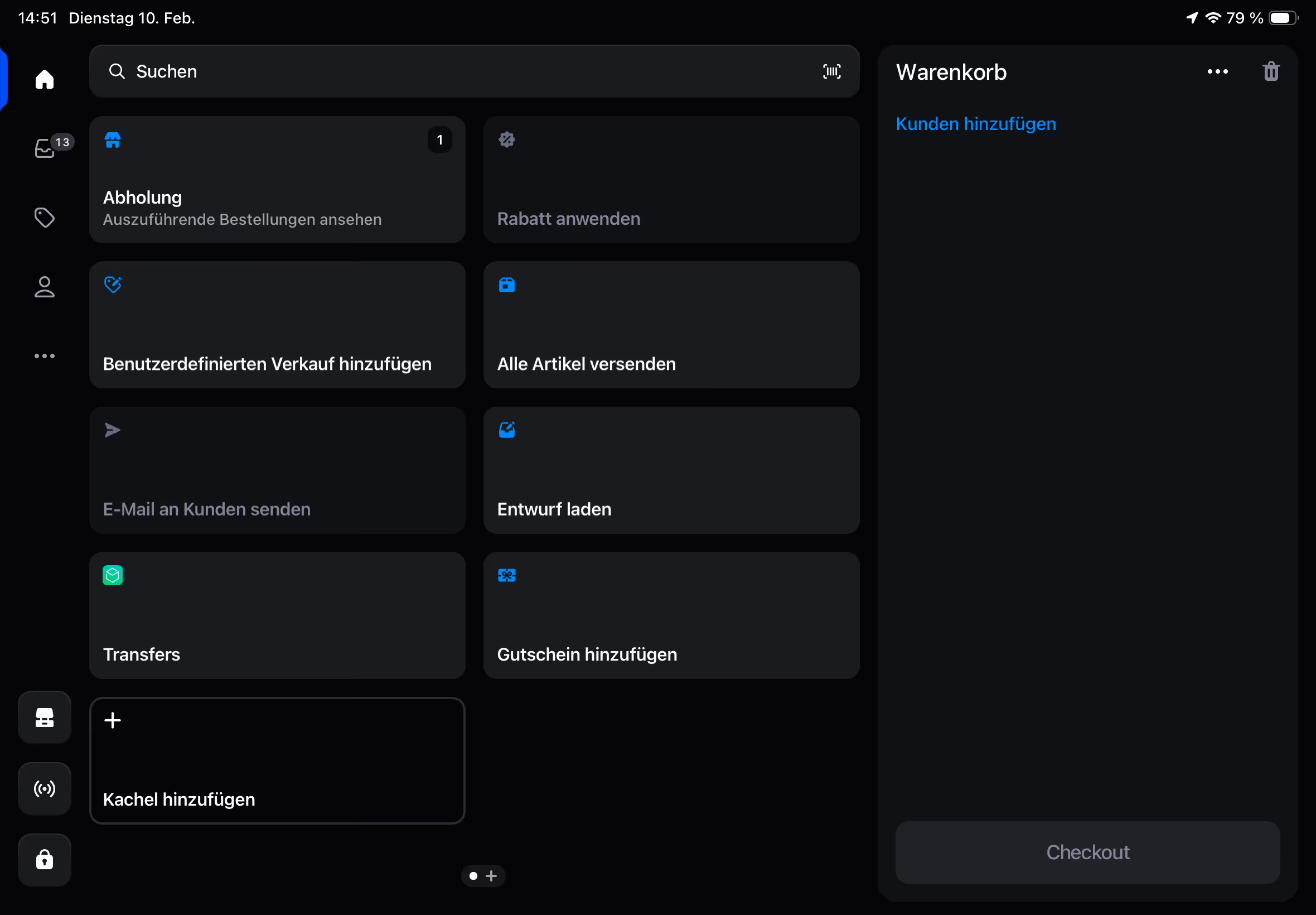
As soon as an online order is picked up, it becomes visible in Shopify POS. Using their own tile in the smart grid, the team in the store immediately recognizes new collection orders. Push notifications can also be set up.
In the POS, the team can:
- View the order
- Assemble and prepare products
- Mark the order as “ready for collection”
- Notify customers automatically
When customers arrive at the store, the order is marked as “picked up” at the POS. The process is clearly structured and fully integrated into the existing cash register system.
This ensures efficient processes in the store and a professional customer experience.
Why Click‑and‑Collect is a powerful omnichannel component
Click-and-collect with Shopify POS brings online and offline inventory together in one system. Retailers avoid media breaks and create a uniform database for warehouses, customers and reporting.
At the same time, customers benefit from a consistent process — regardless of where they start the purchase. Sales are lost less often because products are out of stock in the store but are available online or in another location. In-store pickups also result in additional Upsell opportunities: Customers try on, change sizes or buy additional products. Retailers are also reducing their shipping and logistics costs. Click-and-collect is therefore not only a service, but also a Revenue drivers.
Best practices for retailers
For Shopify Click & Collect to work smoothly, retailers should consider a few points. Customers must be clear about Pick-up times and locations be informed. In addition, should location names be selected clearly and comprehensibly so that there is no confusion at the checkout.
that POS smart grid should be adjusted so that pickup orders are immediately visible. There is a dedicated layout tile for this purpose:
Clean is just as important Inventory maintenanceso that the availability display in the checkout works correctly.
Anyone who works here in a structured way creates the basis for true unified commerce.
Technical and organizational requirements
For in-store pickup with Shopify POS, local pickup options must be activated in the Shopify admin. Advanced POS features — such as push notifications — usually require a POS Pro subscription needed.
It is also important to have a clean Site structure and a uniform inventory management. The availability display in the checkout only works reliably if inventory levels are maintained correctly.
Conclusion & lead focus
Click-and-collect is no longer an additional feature, but a central component of modern omnichannel strategies. With Shopify POS Retailers receive a seamless system for online orders and local pickups. This strengthens customer loyalty, reduces frictional losses and creates additional sales potential in stationary retail.
As a Shopify partner agency, we help you set up click-and-collect strategically — from inventory synchronization to POS workflows to optimizing the entire customer experience.
Createsome Recommends
Get started safely with the Shopify POS system
A successful POS system requires more than just hardware. We support you in selecting devices, setting them up, configuring data and system settings, and training your team. This ensures that your POS runs smoothly right from the start—and we remain a reliable partner for your business even after go-live.