Does it still have to be a printed receipt today?
The printed receipt is still standard in retail stores: connect the receipt printer, the receipt comes out, and you're done. It works reliably — whether via Bluetooth, WLAN, LAN or USB. At the same time, it is a setup that creates permanent effort: thermal paper has to be bought in, appliances break down, rolls change at the worst possible moment. And the whole thing is not sustainable anyway.
Shopify POS has long gone further here. Many stores can now work completely or at least mostly digitally — without the process at the checkout becoming more complicated. On the contrary: In well-planned processes, the checkout is often even faster.
What receipt options does Shopify POS offer by default?
Shopify POS supports printed and digital receipts. This is convenient because you don't have to decide “all or nothing” right away.
Printed document (receipt)
For retailers, this means in concrete terms: Brick-and-mortar retail works technically like another sales channel and not like a separate cash register system. In this way, inventories can be managed centrally, prices can be kept consistent and customers can be served without interruptions in the buying process.
Digital receipt (email or SMS)
Immediately after checkout, the receipt can be sent digitally — either via email or via SMS. The document is therefore immediately available to the customer, completely without paper and without additional steps afterwards.
QR code receipts with OpenFiskal: Even faster & easier
Email and SMS work well — but they take time when data needs to be typed in or dictated. This is exactly where QR code documents are particularly strong: After checkout, a QR code is displayed on the POS tablet, customers scan it, the document opens in the browser and can be saved or downloaded directly.
Why it works so well in stores:
- no data entry (no e-mail typing, no telephone number dictation)
- fast checkout, especially at high frequency
- pleasant for the team and customers
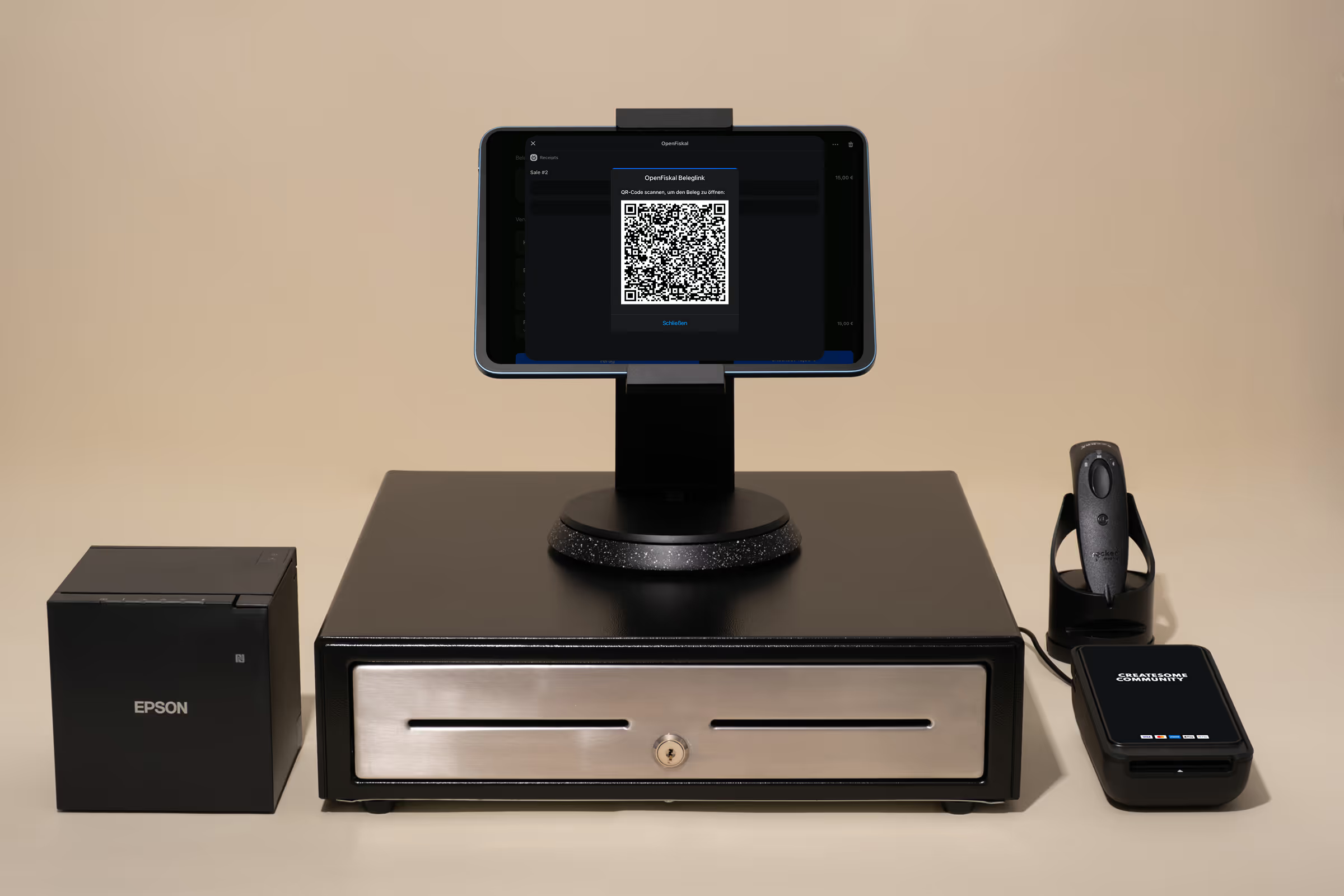
QR code popup on the POS tablet
UX tip: A rotating tablet stand is a small but effective lever. Briefly turn the tablet to the customer, scan, done — often in just a few seconds.
Individual design of digital receipts
Digital documents are not just mandatory documents. With OpenFiskal, they can be designed in accordance with CI and extended with service information. This makes the receipt a branding touchpoint after purchase — instead of a note that ends up in the trash.
Documentation requirement: Are digital documents legally secure?
In Germany, there is an obligation to issue receipts. The decisive factor is that a document is offered — not that it necessarily has to be printed. A digitally provided document (e.g. via email, SMS or QR code download) can fulfill the documentation requirement, provided that all mandatory information is included and the transaction is properly recorded.
In addition to the documentation requirement, the TSE requirement (technical safety device) is often relevant. Shopify POS displays the cash register software — but the legally required TSE protection is usually integrated via specialized providers. This is where OpenFiskal comes in as a partner solution.
Our continuing blog post Implement Shopify POS, TSE & KassenSichV in a legally secure manner goes into more detail about the legal requirements and practical implementation.
Why digital documents are economically worthwhile
Digital receipts not only save paper, but also reduce hardware and complexity in the store. Depending on the setup, the printer can be used less frequently or even omitted altogether.
The most important effects at a glance:
- lower costs for printers, thermal paper and maintenance
- faster checkout processes
- more sustainable brand impact
Case Study: Viviry
Viviry operates 11 locations with Shopify POS and relies almost exclusively on digital receipts. Several branches have already completely dispensed with receipt printers. QR code receipts support fast processes at busy cash registers.
When a hybrid setup makes sense
Not every store has to go completely paperless right away. In practice, it often proves successful: digital as a standard, printing only as an exception. Especially with several cash registers, a common network printer can be useful so that a paper receipt is still possible when needed — without placing hardware everywhere.
What retailers should consider when implementing
For digital receipts to really “run” in everyday life, clear team processes and a clean POS setup are needed. This includes the right configuration, brief employee training and useful tablet positioning (especially for QR code flows).
As a Shopify partner agency, we support you right here: We check your setup, clarify requirements and optimize the checkout flow — so you can reduce hardware costs and simplify processes.
Conclusion: Shopify POS can do more than just print
Digital receipts are cost-effective, more sustainable and often faster. Shopify POS already offers strong standard options for this. With extensions such as OpenFiskal, QR code receipts and the design of digital receipts can be implemented in such a way that they really save time in the store.
Createsome Recommends
Paperless payment — request a setup check
Would you like to check whether your store can fully or partially switch to digital receipts?
We analyse your POS setup and show you how to simplify processes, reduce hardware costs and remain legally compliant.