We are a young creative team and love creating new things and making existing things better. We are more than an e-commerce agency and your direct partner for online shops, websites, content creation and much more. Looking for a collaboration?
Shopify POS Hub Review: More stable hardware connections for your POS system
The Shopify POS Hub is intended to reduce typical Bluetooth and WiFi problems in the store by connecting POS hardware centrally via cable. This article shows unboxing, connections, setup and practical testing — including an important restriction on the Shopify POS terminal and a tip for reliable card payments.
We see the same pattern in many Shopify POS setups: printers, scanners, or card readers are attached to the iPad via Bluetooth or WiFi. This is flexible and often completely okay for smaller setups — but typical problems arise again and again in everyday store life. Connections break down, pairings are suddenly “gone” after updates, the WLAN is unstable (especially in old buildings or when busy) and in the end, it costs time exactly when things have to be fast.
Shopify is therefore expanding its hardware ecosystem with the POS Hub — a central connection station for wired POS hardware. The idea behind this is simple: Instead of connecting several devices wirelessly, central components are connected directly via cable. This makes the setup more predictable — and, in the best case, significantly more stable.
What is the Shopify POS Hub?
The Shopify POS Hub is a hardware station that is installed at the checkout and works with an iPad. The hub allows you to connect several devices via cable, such as printers and scanners, as well as a network (LAN) and power supply.
As a result, an iPad cash register system looks less like a “mobile setup with add-ons” and more like a classic, professional checkout — especially when several devices need to run reliably at the same time.
The hub is particularly interesting for stores with:
fixed cash desks
higher customer frequency
several connected devices (scanner + printer + card solution)
Video: Unboxing & Shopify POS Hub Setup
We pre-ordered the POS Hub last year and now we've finally received it. In the video, we show the entire process from “box open” to “running at the checkout”: unboxing, setup, setup in Shopify POS and our first practical impression:
Unboxing: What's included
When unpacking, you quickly notice that the hub is intended for the counter — i.e. for a fixed installation. Our package included:
the POS hub
power supply
USB-C connection cable for iPad
an adapter (depending on iPad model)
Mounting material (pads/screws) for fixed mounting
The hub itself is compact, looks high-quality (aluminum housing) and is built in such a way that it can be integrated unobtrusively at the cash desk.
POS Hub connections
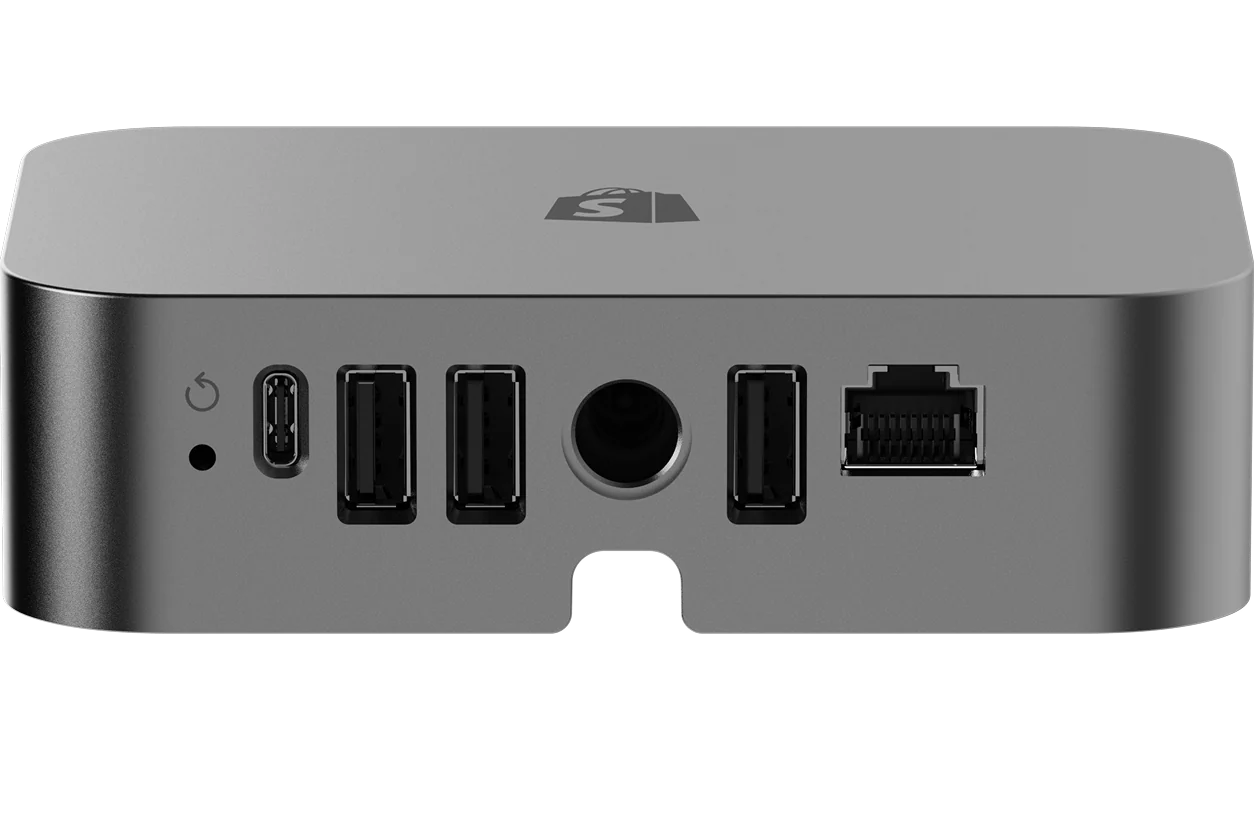
The POS Hub is basically a port center for Shopify POS hardware. The USB ports and LAN were particularly relevant for us:
3× USB-A (e.g. for printer, scanner, card reader)
1× USB-C (connection to iPad)
Ethernet/ LAN (for stable network connection)
power connection
It is precisely the interplay of several USB devices plus LAN that makes the hub exciting in everyday life, as a result fewer wireless connections are “critical” in the setup.
The setup was surprisingly easy for us and felt like “plug in and go.”
Connect power: Hub to power supply.
Connect iPad: iPad to the hub via USB-C.
Connect hardware: Printer/scanner/card solution to USB, optional LAN to Ethernet.
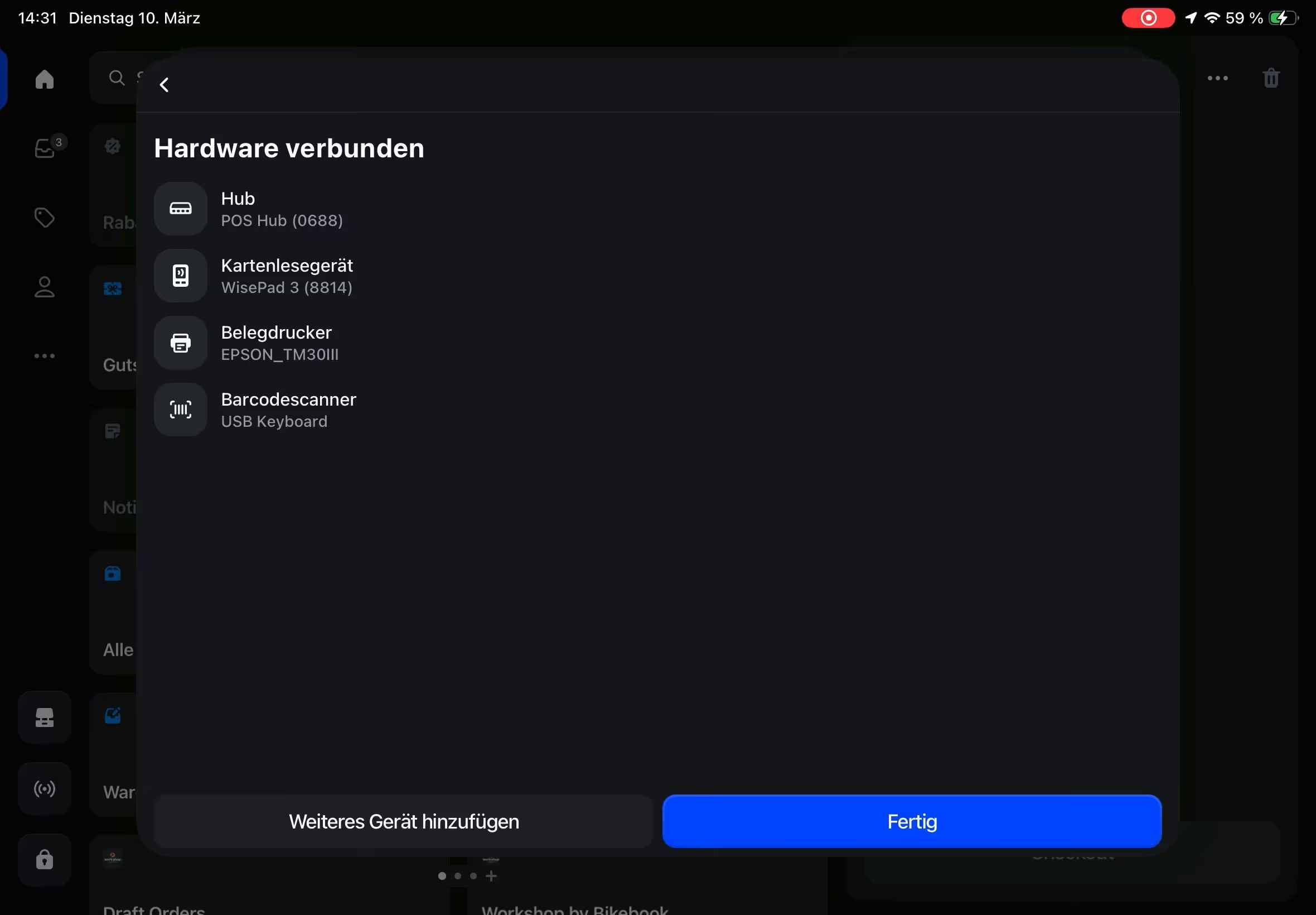
As soon as the hub was connected, Shopify POS opened the hardware configuration in the app or recognized the devices directly. That's exactly where you notice: Shopify doesn't want this to be a tinkering lesson, but to be ready to use quickly.
Shopify POS hardware setup
Our test: Which devices work with the POS Hub?
In our first test, the most important devices were immediately stable:
Receipt printer (USB)
Barcode scanner (USB)
WisePad 3 card reader
Ethernet/LAN for iPad network connection
Printers and scanners in particular benefit enormously from the wired connection. Many typical Bluetooth problems (disconnections, “device not found”, repairing) are simply eliminated — and that is exactly what makes the difference in day-to-day business.
Important note: Shopify POS terminal limitation
However, one point became very clear in the test: The Shopify POS terminal can be charged via the hub, but it cannot be connected via USB as a data connection.
That means:
The iPad ↔ POS terminal connection continues to run via WLAN
Here, the hub is primarily a power supply, not a “replacement connection”
That is often okay in stable store networks. However, in scenarios with fluctuating WLAN quality, the terminal connection can still be the most sensitive part of the setup, for example when:
Events and trade fairs
pop-up stores
Locations with guest networks or weak coverage
Recommendation for stable card payments
If you need a card payment that is as stable as possible, with little WiFi-dependent connection, the WisePad 3 in conjunction with the hub is the more reliable option for us. It ran smoothly and benefits from the overall more stable infrastructure at the cash desk.
Our practical recommendation: The WisePad 3 is often also worthwhile as a backup device if the terminal setup reaches its limits in certain situations (e.g. events).
Our Shopify POS Hub Review
After the first test, we would classify the hub as follows:
Stability: ★★★★★(5/5)
Establishment: ★★★★☆ (4/5)
Hardware integration: ★★★★☆ (4/5)
Terminal integration: ★★★☆☆ (3/5)
Overall: ★★★★☆ (4/5)
The hub solves many typical hardware problems — especially with scanners and printers. However, the lack of USB data connection for the POS terminal is currently a limitation that may be relevant depending on where it is used.
Conclusion: A useful step for professional Shopify POS setups
The Shopify POS Hub isn't a spectacular new feature — but it's a important infrastructure improvement.
Benefit in particular:
Stores with fixed cash desks
Retailers with multiple connected devices
Resellers who want to avoid Bluetooth issues
We will also be testing the hub in real store setups over the coming months and continuing to share our experiences.
Createsome Recommends
Optimize Shopify POS setup
If you want to launch or optimize Shopify POS in your store, we'll help with:
We'll find the right POS solution for your business — including hardware, setup and clear recommendations. Ready to go even without an online shop, with potential for more.
Data migration & system setup
We set up your POS: products, taxes, receipts, Fiscalization — everything is correct and complete. Also ideal for retailers without an existing Shopify store.
Staff training on site & ongoing support
Your team will be trained by us — comprehensible and practical. After that, we will continue to be by your side for support, optimization and new functions in everyday life.
Shopify POS hardware FAQ
The most common questions & answers about Shopify POS hardware
What devices do I need for Shopify POS?
To get started, you need an iPad or Android tablet, a card reader, a receipt printer and possibly a cash drawer. We'll help you choose the right hardware for your business.
Does Shopify POS also work with my existing hardware?
Partially — some devices are compatible, others aren't. We'll check for you which hardware can be seamlessly integrated so that your POS system runs smoothly.
Do I need internet for Shopify POS?
Yes, an Internet connection is required for most features. However, your POS can also record offline sales and automatically synchronize them as soon as a connection is reconnected.
Can I use multiple devices at the same time?
Yes, Shopify POS supports multiple tablets and card readers at the same time, ideal for teams or multiple checkout stations.
What happens when a device fails?
We will advise you on backup solutions and replacement devices so that your sales continue even if there are hardware problems.
How easy is it to set up the hardware?
We take care of the entire set-up — from device installation to system settings — so your team can get started right away.
Stop scrolling...
Write to us or book an introductory call!
In a personal conversation, most things are clarified much more quickly: whether we fit in and like each other and, above all, whether we can help you with your problem. So come by and let's talk or get to know us online!